Built from Q2–Q3 2026 discovery calls with contractors evaluating a switch.
One remodeler we talked to had switched software five times. Each move cost him something a client list here and two years of pricing there, so by the sixth tool he'd stopped trusting any of them. It doesn't have to go that way: you can switch construction software without losing your data by exporting your records first, running the new tool alongside the old one before you commit, and confirming you can get your data back out if you ever leave. Do it in that order and you keep every client, every project, and every price, with no gap in the jobs you're running today.
Why switching construction software feels risky
For another customer, he put it plainly: everything he'd built lived inside his current software, and the thought of moving it — or losing it — was the only thing keeping him from a tool he liked better. That scar tissue is common. Here’s why.
- Years of clients, pricing, and job history feel too heavy to move
- A bad migration could stall the jobs you're running right now
- Nobody wants to learn a sixth platform after five let them down
- The last vendor made leaving hard on purpose
Capterra's software buying guide advises small-business owners to ask about data migration support and portability before committing to any platform. The goal is to make sure that if you make a switch, your data survives it.
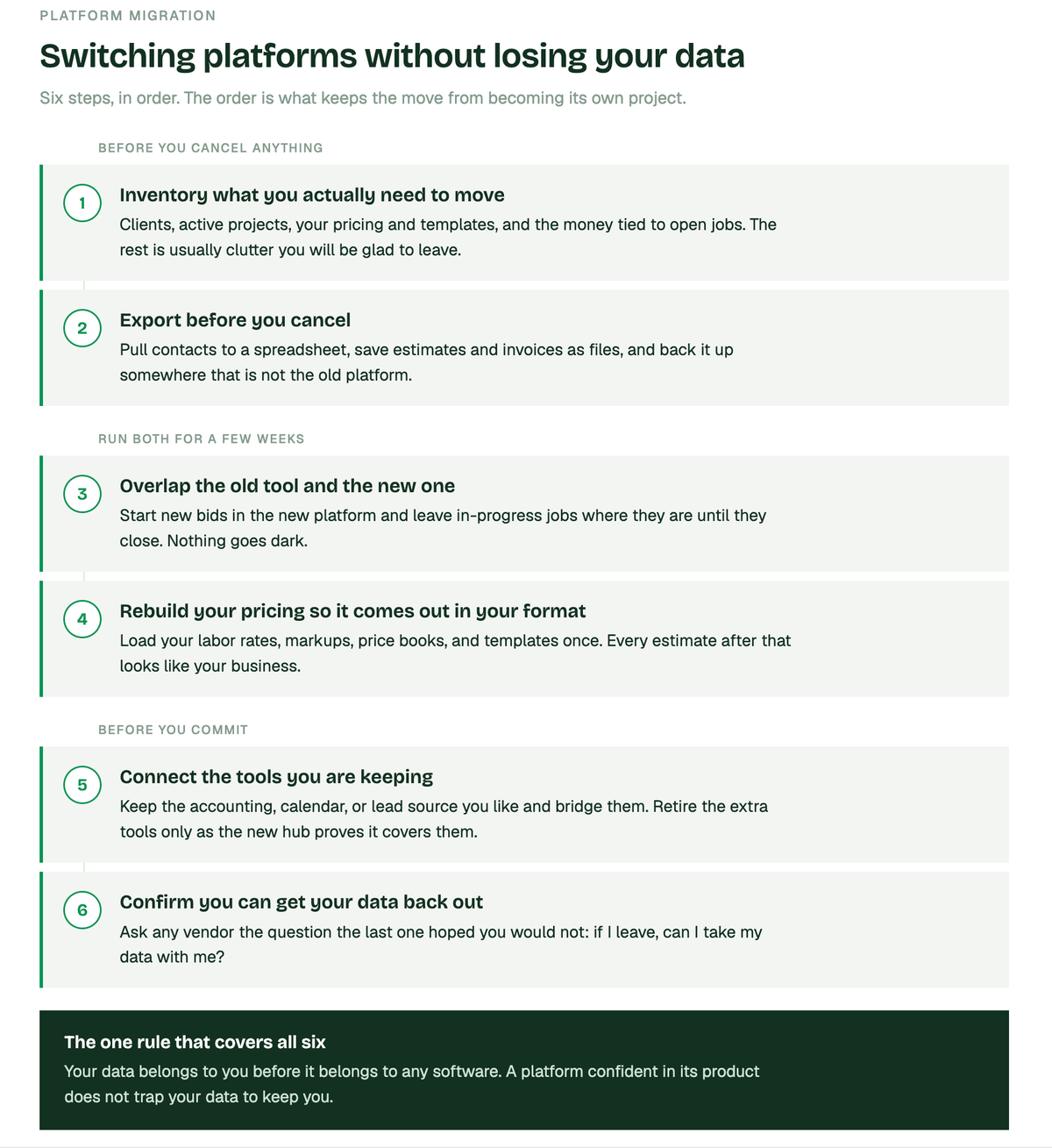
The 6 steps to switching platforms without losing all your data
Step 1: inventory what you actually need to move
Before you export a thing, list what matters. Most of what clutters an old platform is noise you'll be glad to leave.
- Clients and contacts — names, phones, emails, addresses
- Active and recent projects, with their estimates and status
- Your pricing: rates, markups, templates, and any catalogs you've built
- Financial records tied to open jobs — invoices, payments, what's still owed
That short list is the spine of your business. Everything else is usually a fresh start you'll appreciate. Knowing what to move keeps the migration from becoming its own project.
Step 2: export your data before you cancel anything
Never cancel the old subscription until your data is exported and confirmed. This is the step contractors skip when they're frustrated, and it bites.
- Pull contacts and clients to a spreadsheet — most tools export to CSV
- Export or download estimates, proposals, and invoices as files you keep
- Screenshot or save your pricing setup, markups, and templates so nothing's rebuilt from memory
- Back it all up somewhere that isn't the old platform
One contractor described his workaround for years: print it, scan it, save it to the iPad, lose it on the desktop, rebuild it in a spreadsheet. Exporting cleanly, once, ends that loop. Your data belongs to you before it belongs to any software.
Step 3: run the new tool alongside the old one
The safest switch is an overlap. Keep the old system running the jobs already in it and start new bids in the new tool. A free trial is built exactly for this.
- Start your next new estimate in the new platform and see how it feels on a real job
- Leave in-progress jobs where they are until they close
- Compare the new estimate against numbers you already know are right
- Move fully only once the new tool has earned it
Contractors who overlap for a few weeks switch with zero downtime, because nothing ever went dark. Your AI Teammate can be running your next bid before you've closed your last job in the old system.
Step 4: rebuild your pricing so it comes out in your format
The reason estimates feel "off" in a new tool is almost always setup, not the software. One remodeler nearly walked away over outputs that didn't match his format until a setup session fixed it in minutes. Load your rules once and every estimate after that looks like your business.
- Enter your labor rates and markup rules so margins are protected automatically
- Upload your own catalogs and price books so materials price at what you actually pay
- Save your templates so proposals come out in your layout, not a generic one
- Set your defaults so the AI stops guessing and starts matching how you work
QuickBooks integration keeps your accounting connected through the move, so the financial side doesn't fracture. You can even track budget vs. actuals from inside the app. Handoff is meant to be the one place your project knowledge finally lives, instead of scattered across tools.
Step 5: connect the tools you're keeping
Switching your estimating and project hub doesn't mean abandoning every other app the same week. [Bridges](https://handoff.ai/blog/connect-handoff-to-every-tool-you-already-use.) let you move at your own pace.
- Keep the accounting, calendar, or lead source you like and connect them
- Use connected workflows to pass leads and data between tools automatically
- Let a website form or lead source create a project on its own, so nothing's typed twice
- Retire the redundant tools only as the new hub proves it covers them
- Finally, if you have any agents you want to integrate, follow the steps for integrating it through API Access.
Research published by Construction Dive shows the average contractor operates with 5–7 software systems across estimating and project workflows — the win is fewer tools that finally talk. A connected setup means less double entry and one place to look.
Step 6: confirm you can get your data back out
The last step protects you from repeating the whole cycle later. Before you commit, ask any vendor the question the last one hoped you wouldn't: if I leave, can I take my data with me?
- Confirm you can export clients, projects, and financials on your own, any time
- Make sure migration help is part of onboarding, not a paid add-on you discover later
- A vendor that answers this straight is telling you how they'll treat you as a customer
A platform confident in its product doesn't trap your data to keep you. Handoff keeps your business data yours both coming in, and going out.
Make the switch without the leap of faith
You don't have to gamble your data to try something better:
- Start a free trial — no credit card needed
- Export your clients and pricing from your current tool first
- Run your next new bid in Handoff while old jobs finish where they are
- Load your rates and catalogs in the setup session, then retire the old tool once it's earned it
Switching software isn't the risk. Losing your data is — and that only happens when you skip the steps. Handoff makes the move something you control, not something you dread.
Other FAQs about migrating your information to Handoff
How long does it take to migrate to new construction software?
Most small remodelers are building real estimates the same day and fully switched within a couple of weeks, because in-progress jobs stay in the old tool until they close. The pace is yours. There's no forced cutover date.
Will I lose my job history and past estimates when I switch?
Not if you export before you cancel. Your clients, projects, and past estimates move over or get archived as files you keep, and running both systems in parallel means nothing goes dark during the transition.
Can I switch estimating tools without changing my accounting software?
Yes. A QuickBooks integration and connected workflows let you keep the accounting you already use while you change how you estimate and run projects, so the financial side stays intact.