The best AI estimating software for contractors does three things: builds accurate line-item estimates fast, works on a phone from the job site, and doesn't require a dedicated estimator to run it. For smaller remodeling businesses, that list is shorter than the marketing makes it sound. Most estimating tools were built for commercial GCs or large firms and the pricing, complexity, and setup time reflect that.
This is a rundown of what actually works for contractors doing $500K to $3M in residential remodeling, based on what the tools do, what they cost, and where they fall short.
Best AI estimating software for contractors: the shortlist
These are the tools worth evaluating for a small residential construction operation. Each one has a genuine use case and a real reason to pass on it.
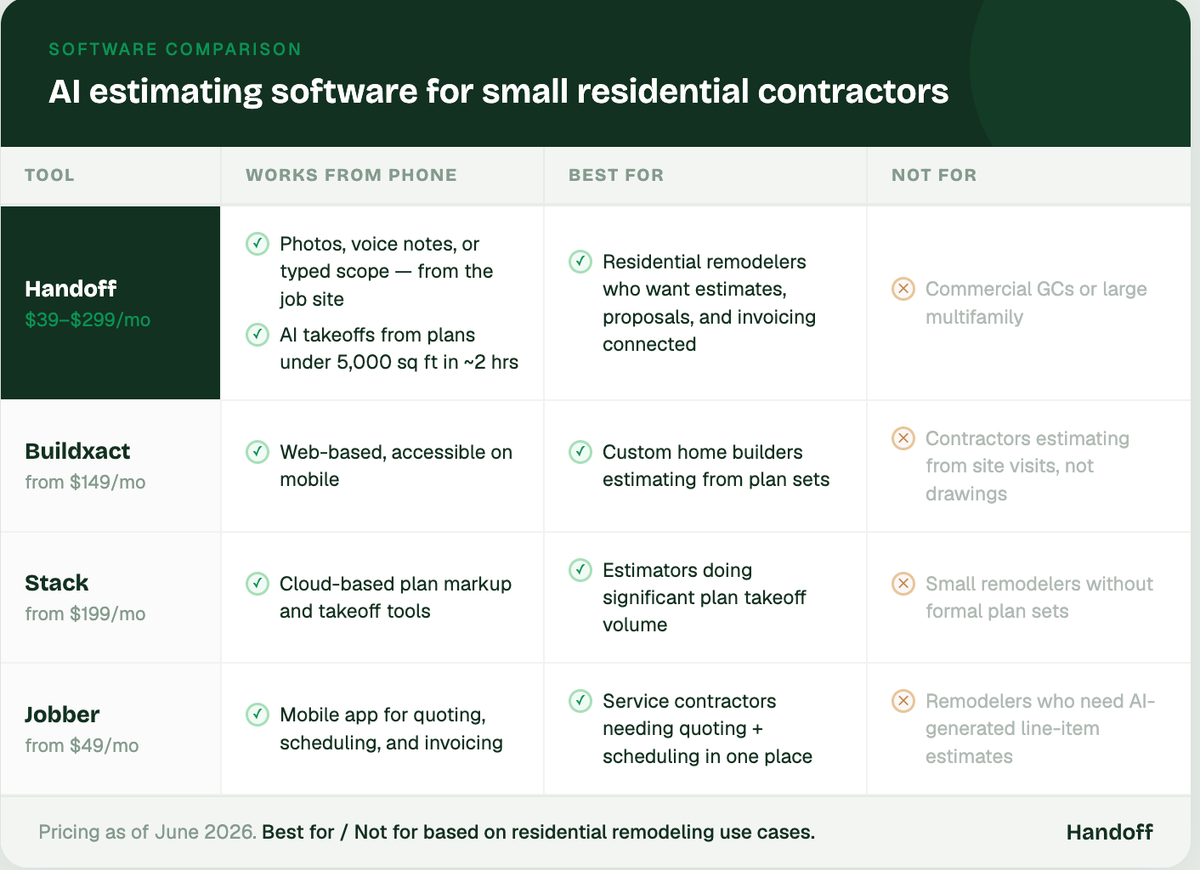
Handoff
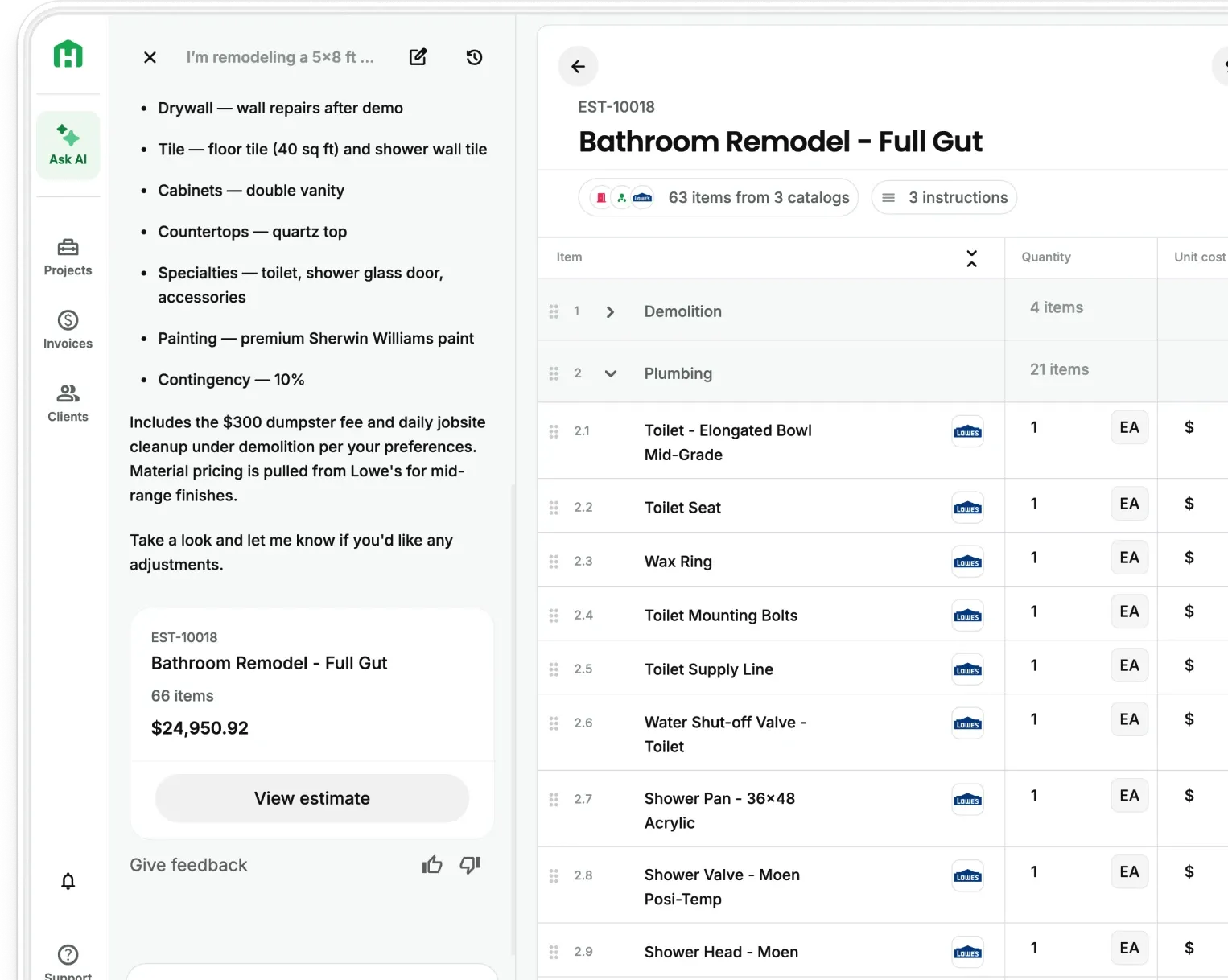
- Builds line-item estimates from jobsite photos, voice notes, or a typed scope summary
- Proposals are client-ready with your markup, branding, and payment terms built in
- Works from your phone — on the job site, in the truck, or at the desk at night
- Connected to change orders and invoicing so the estimate stays the source of truth through the whole job
- Takeoffs from plans up to 5,000 sqft ready in under 2 hrs
- Cost: $39–$299/month with Scale and Enterprise plans available
Best for: Residential construction who want estimating, proposals, change orders, and end-to-end project management in one place
Not for: Commercial general contractors
Buildxact
- Template-based estimating with material takeoffs and supplier pricing
- Stronger on the plan-reading side for contractors working from drawings
- Cost: starts around $149/month
Best for: Custom home builders who estimate from plan sets
Not for: Contractors who primarily estimate from site visits rather than drawings
Stack
- Cloud-based takeoff and estimating — strong on digital plan markup
- Designed for contractors who do their own plan takeoffs rather than outsourcing them
- Cost: starts around $199/month ($149/ month annually)
Best for: Estimators who spend significant time on plan takeoffs and want digital markup tools
Not for: Small remodeling contractors who don't work from formal plan sets regularly
Jobber
- Quoting, scheduling, invoicing, and client management in one platform
- Estimating is functional but not AI-driven — no automatic line-item generation
- Cost: starts around $49/month
Best for: Service contractors and trade businesses that need quoting + scheduling + invoicing together
Not for: Remodelers who need AI-generated estimates with detailed breakdowns
Your AI Teammate builds the estimate from whatever you captured on the walkthrough so the proposal goes out the same day instead of sitting in a queue until you find time to type it up.
Best construction estimating software for small contractors specifically
"Small contractor" is doing a lot of work in that statement. And it matters, because most estimating tools are priced and designed for operations with a dedicated estimator on staff. The right software for a two or three-person remodeling team has different requirements.
What small contractors actually need from estimating software:
- Works from a phone. The estimate gets built during the walkthrough or on the drive home, not at a desktop at 9pm after reviewing printed plans.
- No learning curve. A tool that takes 40 hours to set up correctly doesn't help a contractor who needs to win the next job. The setup should pay off in the first week.
- Estimate-to-proposal in one step. Small teams don't have time to export a spreadsheet, format it in Word, and email a PDF. The proposal should be client-ready from the same place the estimate was built.
- Priced for one-person back offices. Tools designed for large firms often charge per seat or per project. For a two-person shop, that math doesn't work.
According to JBKnowledge's Construction Technology Report, the biggest barrier to software adoption for small contractors is time to value. Tools that don't produce a useful output in the first session get abandoned. The best estimating software for small contractors is the one that works on day one.
Handoff is built specifically for this: residential remodelers, new builds, and GCs with small teams who need to estimate fast, look professional, and move on to the next job.
How to automate construction estimates without rebuilding your whole process
Automation in estimating doesn't mean replacing your judgment. It means removing the parts that don't require judgment — rebuilding the same line items, looking up prices you already know, formatting a document you've formatted fifty times.
The pieces worth automating, in order of impact:
- Scope capture — record a voice note or take photos during the walkthrough instead of writing everything down by hand. Your AI Teammate converts that input into a structured scope.
- Material pricing — connect your supplier accounts once and estimates pull your actual Pro pricing per line item instead of catalog prices you have to manually verify. Handoff connects with Home Depot pro account, ABC Supply, and Ferguson.
- Markup and formatting — set your labor rates, markup percentage, and proposal template once. Every estimate that follows applies them automatically.
- Follow-up — a three-touch sequence at day 3, day 7, and day 14 after sending a proposal closes 30–40% more jobs than sending and waiting. Set it once, let it run. You can now do this automatically from the Handoff app.
NAHB data shows that contractors who automate their estimating and follow-up process close significantly more proposals per month without increasing the hours they spend on admin. The estimate you send is the first signal of how organized your operation is.
What to look for in AI estimating software before you buy
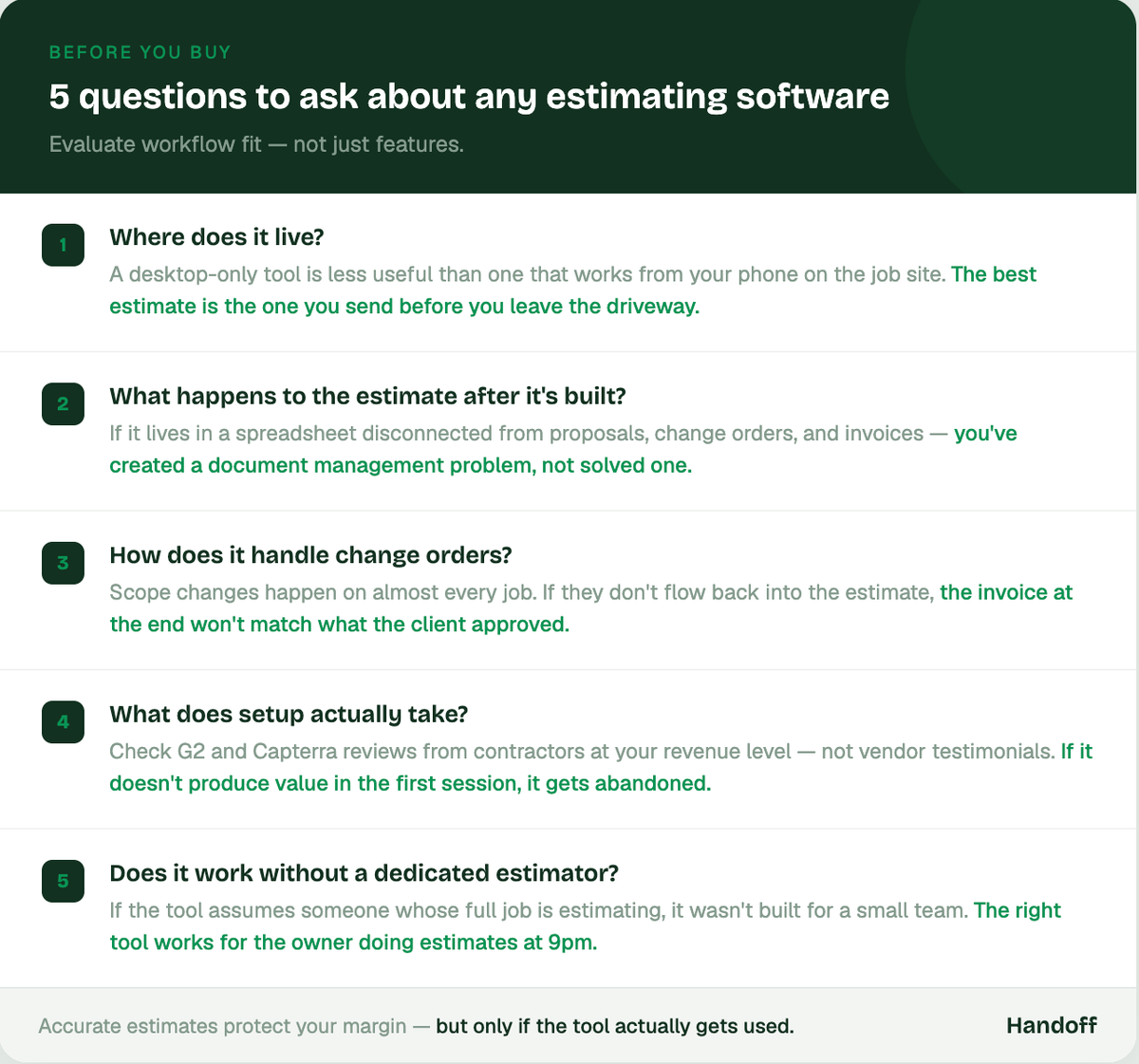
Most contractors who buy the wrong estimating tool make the same mistake: they evaluate features instead of workflow fit. Here's what actually matters for a residential remodeling business.
- Where does it live? A tool you can only use at your desk is less useful than one that works from your phone on the job site. The best estimate is the one you send before you leave the driveway.
- What does it do with the estimate after it's built? If the estimate lives in a spreadsheet that isn't connected to proposals, change orders, or invoices, you're creating a document management problem instead of solving one.
- How does it handle change orders? Scope changes happen on almost every job. If those changes don't flow back into the estimate, the invoice at the end of the job won't match what the client approved.
- What does setup actually take? Look for honest user reviews on G2 and Capterra from contractors at your revenue level — not testimonials on the vendor's own site.
- Does it work without a dedicated estimator? If the tool assumes someone on your team whose full job is estimating, it wasn't built for you.
Accurate estimates protect contractor margins from the start but only if the tool actually gets used.
Getting started with Handoff
- Create your free account at app.handoff.ai/sign-up
- Set your labor rates, markup, and proposal template. Takes about 30 minutes
- Submit your next site visit scope by photo, voice note, or typed summary
- Review the AI-generated estimate, adjust any line items, and send the proposal same day
- Connect your supplier accounts to pull live Pro pricing on every estimate going forward
Other FAQs about AI estimators for small construction companies
Is AI estimating software accurate enough to use on real jobs?
Yes, with the right inputs. AI estimating is only as accurate as the scope information you give it. The right workflow is to use AI as a fast first draft, review line items before sending, and adjust anything the site visit didn't capture clearly. Contractors using AI-assisted estimating consistently report fewer missed scope items compared to estimating from memory.
What's the difference between AI estimating software and standard construction estimating software?
Standard estimating software gives you templates and a place to enter numbers manually. AI estimating software takes your site visit inputs — photos, voice notes, or a scope summary — and generates the line items for you. The practical difference is speed: a manual estimate on a familiar scope still takes 1–3 hours. An AI-generated estimate on the same scope takes 15–20 minutes.
Do small contractors really need estimating software, or does a spreadsheet work fine?
A spreadsheet works until it doesn't — and it usually stops working at the point where you're juggling more than two or three active bids, handling change orders, or trying to send proposals the same day as the walkthrough. The contractors who stay on spreadsheets longest tend to be the ones who haven't tracked how many hours per week they're spending rebuilding the same estimate from scratch.