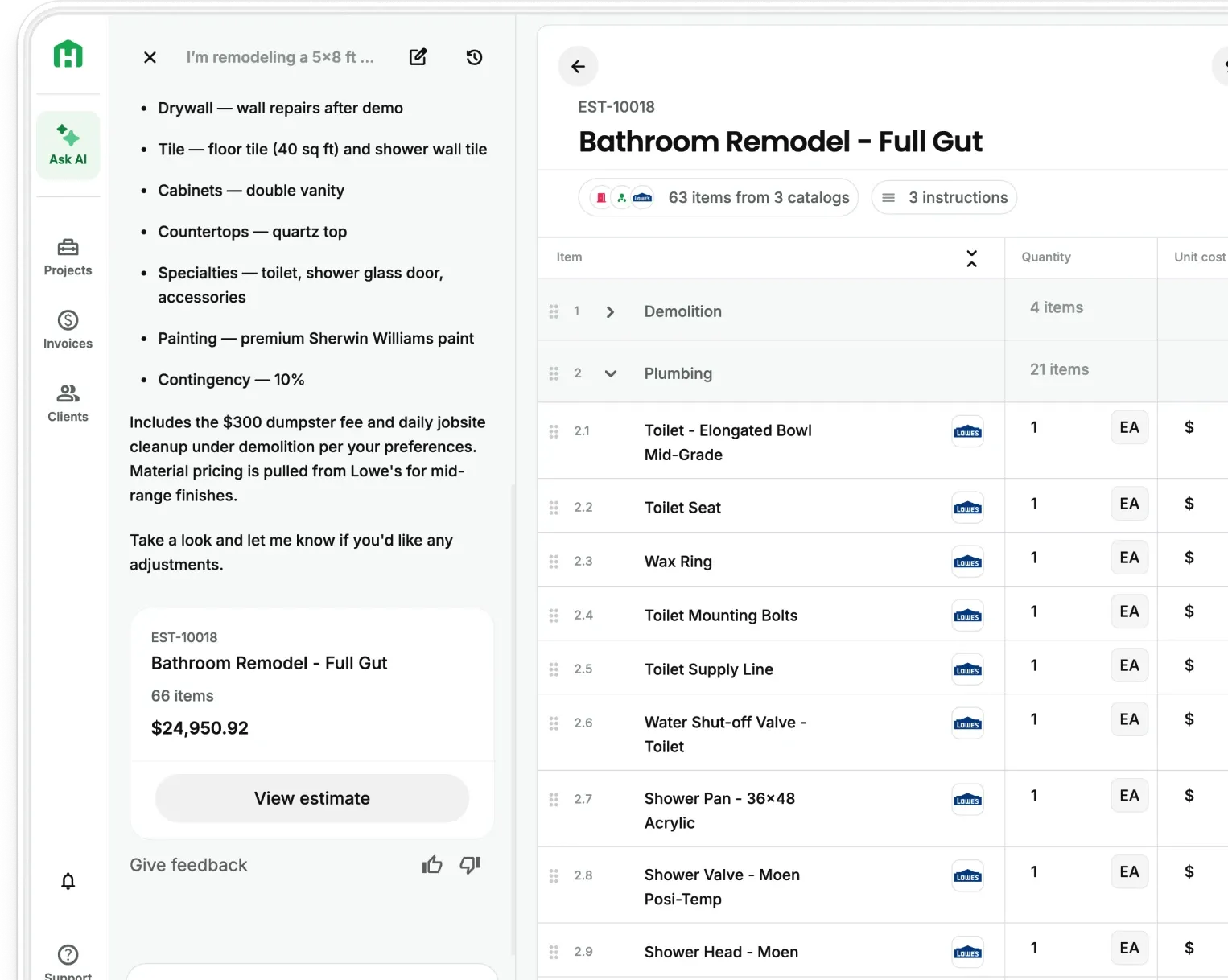
Answer: You can use AI for construction estimating by using software that helps you build estimates faster and more accurately. These tools can handle things like takeoffs, pricing materials and labor, and even flag potential issues before they turn into expensive mistakes. When you plug this into your preconstruction process, you spend less time on manual work and get more confidence in your numbers.
The construction industry is changing fast. Estimating used to mean long hours, spreadsheets, and relying heavily on gut instinct. That still works, but it’s getting harder to keep up, especially as projects get more complex and margins get tighter.
AI gives you a different edge. Instead of guessing or double-checking everything manually, you can build estimates quicker, tighten up your pricing, and stay competitive without burning hours behind a screen. If you want to dive deeper into how this works for GCs, check out our General Contractor's Guide to AI Estimating.
This guide breaks down how to actually use AI in your estimating process, what tools are worth looking at, and what this shift means for contractors moving forward.
Understanding AI in Construction Estimating
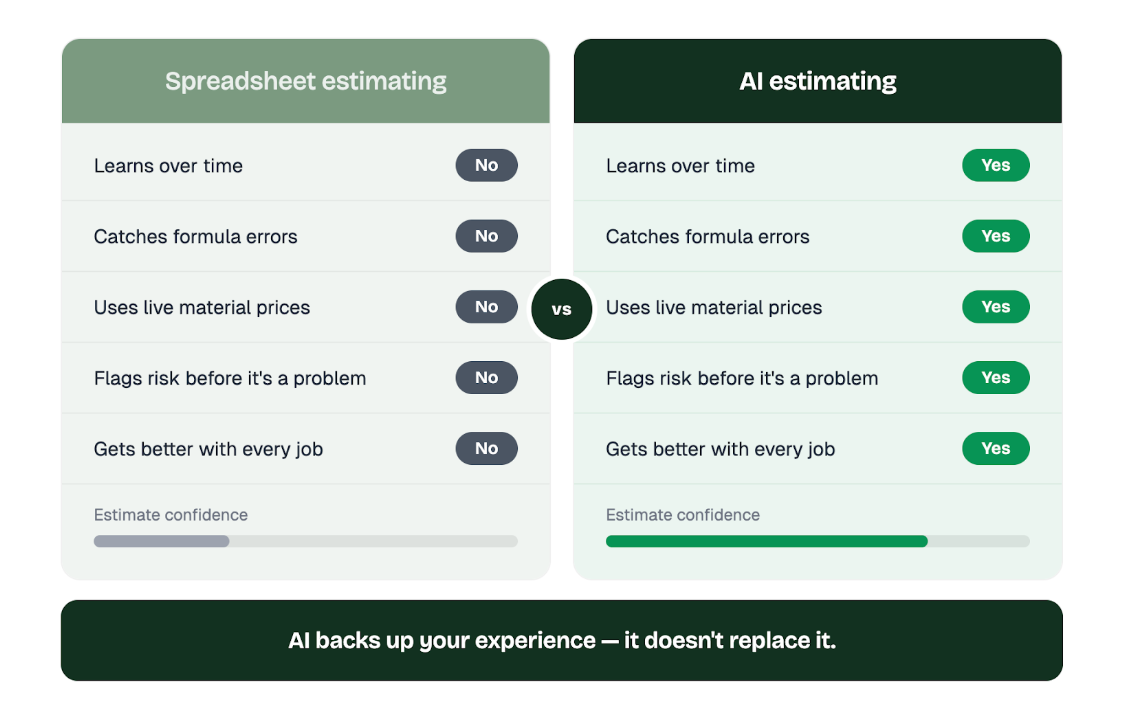
AI in construction estimating is really just about using smarter tools to figure out costs, materials, and labor more accurately. Instead of relying only on spreadsheets and manual inputs, these systems look at past projects, pricing trends, and real-world data to help you build better estimates.
The big difference is this: traditional estimating tools only do what you tell them. AI tools actually learn over time. The more you use them, the better they get at predicting costs and spotting issues.
This shifts estimating from just “running numbers” to actually managing risk. Instead of reacting after something goes wrong, you can catch problems early, before they eat into your profit.
For example, AI can pull from things like past job performance, current material prices, and local labor rates to highlight patterns or red flags you might miss. And that matters, because let’s be honest, most spreadsheet-based estimates aren’t perfect. In fact, a huge percentage of them have errors, whether it’s a bad formula or just a simple data entry mistake.
AI doesn’t replace your experience; it just backs it up with better data and fewer blind spots.
What’s Actually Powering AI Estimating
If you’re going to use AI in your estimating process, it helps to know what’s going on under the hood. You don’t need to be technical, just understand what each piece does for you.
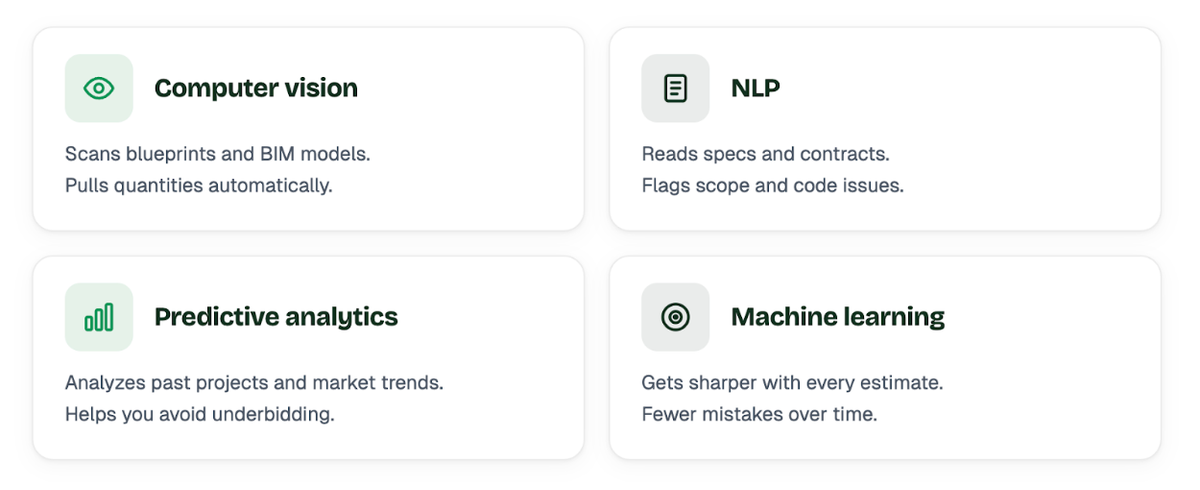
- Computer Vision - This is what lets AI “look at” plans. It can scan blueprints or BIM models, pick up measurements, recognize symbols, and start building out quantities automatically. What used to take hours of manual takeoffs can now get done way faster and with fewer missed items.
- Natural Language Processing (NLP) - Construction docs are a headache. Specs, contracts, scope details, it’s a lot. NLP helps AI read through all of that and pull out the important stuff, like material requirements, code compliance, or anything that could impact cost. It’s like having someone double-check every document without slowing you down.
- Predictive Analytics - This is where things get interesting. Instead of just pricing a job based on today’s numbers, AI can look at past projects and current market trends to give you a better idea of where costs are heading. That helps you avoid underbidding, or getting caught off guard when prices shift.
- Machine Learning (ML) - This is the engine behind everything. The system learns from every estimate and every job you run. Over time, it gets sharper: dialing in your pricing, tightening up your numbers, and reducing mistakes.
At the end of the day, all of this just means one thing: less guesswork, fewer missed details, and more confidence when you send out a bid.
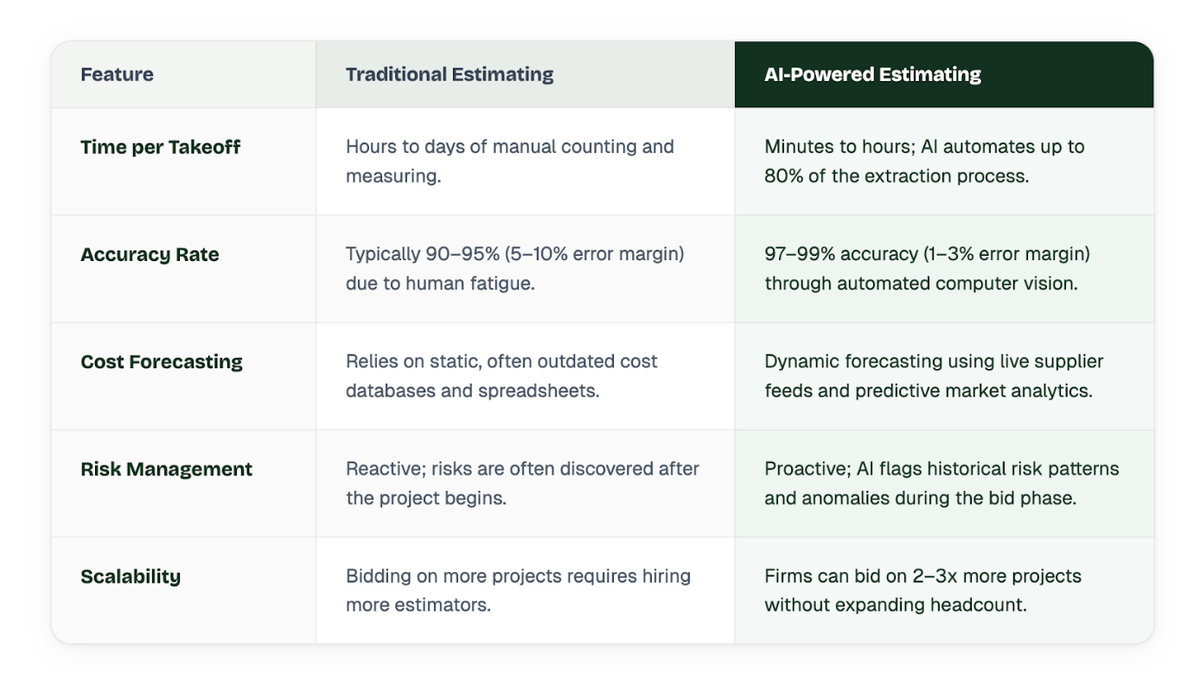
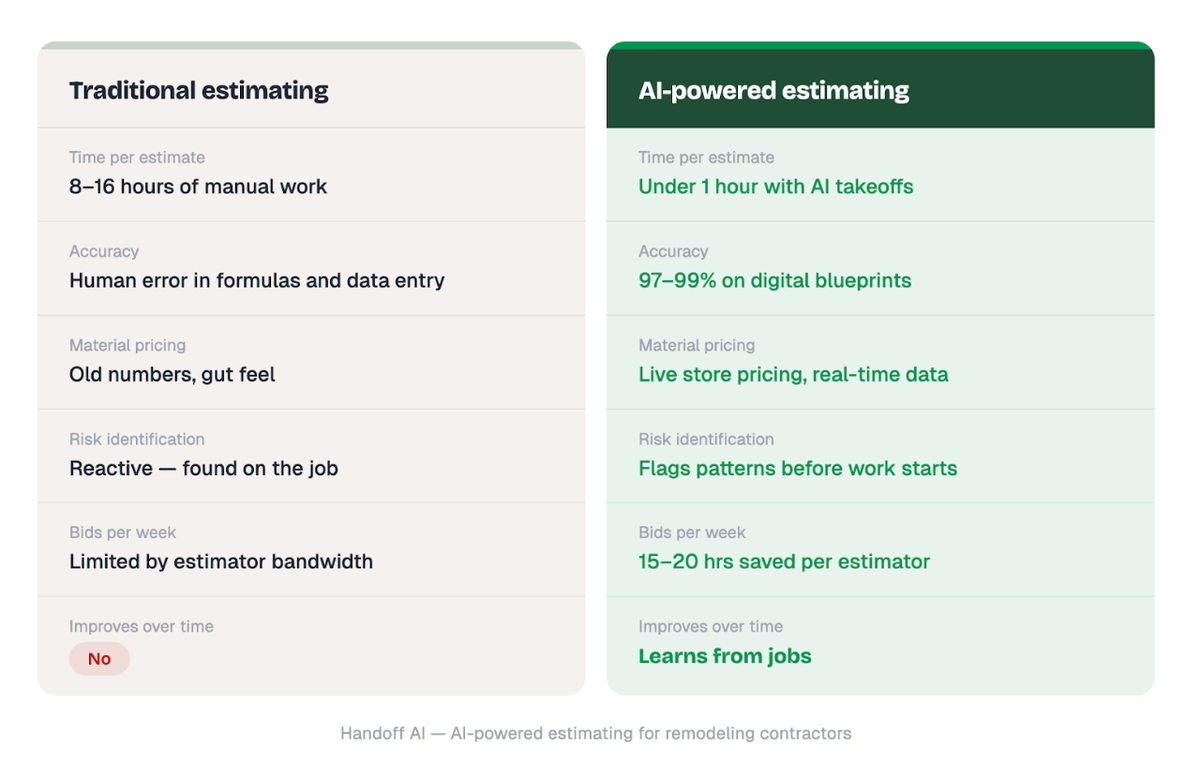
Traditional vs. AI Estimating: A Direct Comparison
Understanding the shift from manual processes to AI-driven workflows highlights the competitive advantage early adopters are gaining.
Step-by-Step: How to Use AI for Construction Estimating
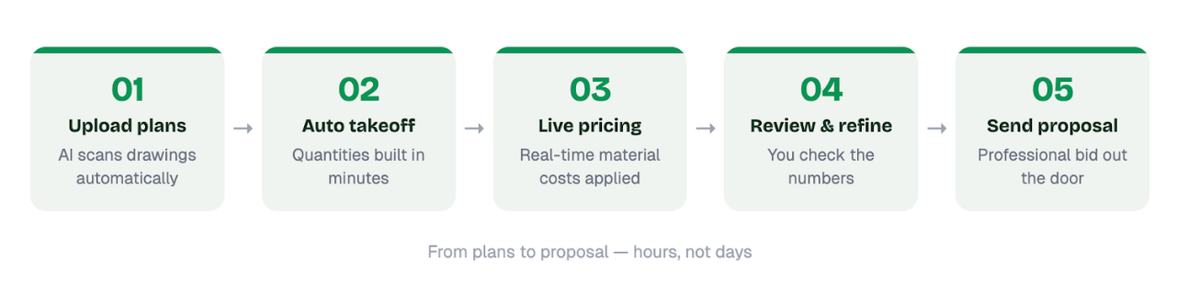
Bringing AI into your estimating process doesn’t have to be complicated. The key is using it where it actually saves you time and protects your margins.
Step 1: Automate Your Takeoffs
This is the easiest win. Instead of manually counting fixtures, measuring runs, and double-checking plans for hours (or days), you can upload your drawings into an AI tool and let it handle the takeoff. It scans the plans, picks up things like doors, windows, outlets, and square footage, and builds your quantities automatically. For a deeper dive into how this works, read our guide on What Is a Quantity Takeoff in Construction?.
You still review it, but you’re starting from 90% done instead of zero. That alone can save a ton of time and cut down on missed items.
Step 2: Get Smarter Pricing (Not Just Faster)
Once your quantities are in place, pricing is where things usually get shaky. Most contractors rely on old numbers or gut feel. AI helps tighten that up by pulling from past jobs and current pricing trends. Some tools even factor in real-time material costs.
For example, with Handoff + Home Depot integration, you can get live store pricing directly in your estimate. So instead of guessing what lumber or concrete might do next month, you’re building estimates based on what’s actually happening right now. That makes your bids more competitive and a lot safer.
Step 3: Clean Up Sub Bids Faster
Comparing subcontractor bids can be messy. Everyone scopes things a little differently, and it’s easy to miss gaps. AI helps by lining bids up side by side and calling out anything that looks off, pricing that’s way too high or low, missing scope, or inconsistencies. It gives you a quick way to spot problems before they turn into change orders later.
Step 4: Catch Problems Before the Job Starts
This is where AI really starts to earn its keep. By looking at past projects, it can flag patterns: things that tend to blow budgets or delay timelines. Maybe it’s labor shortages in your area, certain types of jobs that always run over, or even seasonal issues.
Instead of finding out the hard way, you can plan for it upfront. Adjust your numbers, build in contingencies, or tighten your scope before you ever send the proposal. At the end of the day, AI isn’t replacing your judgment, it’s just helping you move faster, catch more, and protect your profit before the job even starts.
Real-World Results: What AI Estimating Actually Delivers
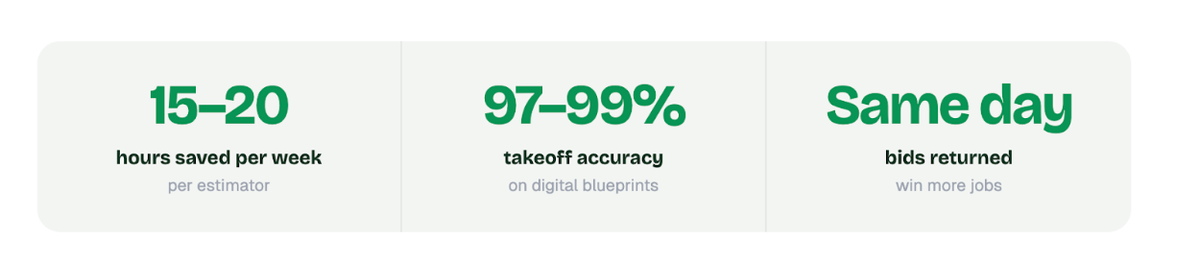
The ROI on AI estimating isn’t theoretical, it shows up pretty quickly once teams start using it.
- Time Savings - Most teams are saving around 15–20 hours per week per estimator. That’s not just “nice to have” time, that’s time you can put toward bidding more jobs, tightening scopes, or actually managing projects instead of being stuck behind a screen.
- Higher Win Rates - Some companies are seeing a noticeable jump in win rates, mainly because they’re able to move faster and submit cleaner, more accurate bids. When you’re not scrambling to finish estimates, you can focus on pricing strategically instead of just getting it done.
- Real Example: Atelier 7 - See How Handoff Transformed Cost Estimation for Atelier 7 to learn how they streamlined their workflow.
- Real Example: Keeler Construction Group - Read How Handoff Helped Keeler Construction Group Streamline Estimating and Boost Productivity.
- Catching Missed Scope - See How Lasting Impressions Caught a $2.5K Missed Scope Using Handoff.
The takeaway is simple: AI doesn’t just make estimating faster, it frees you up to bid more jobs, make better decisions, and protect your margins without working longer hours.
How AI Works with BIM in Estimating
BIM already changed how projects get designed and coordinated. When you layer AI on top of that, estimating gets a lot faster and a lot cleaner.
AI helps by checking the model before you even start estimating. It can catch things like naming issues, missing data, or inconsistencies that would normally cause problems later. Basically, it cleans up the model so you’re not building an estimate on bad information.
It also speeds up the heavy lifting. Instead of digging through a Revit or Navisworks model and pulling quantities manually, AI can scan the entire model, sort through the geometry, and assign the right data to hundreds of elements in minutes.
For estimators, this changes everything. You’re not stuck extracting quantities piece by piece anymore. You can pull accurate numbers straight from the model, with fewer clashes and fewer surprises. And the biggest advantage? As the design changes, your estimate updates with it.
So instead of chasing updates and reworking numbers, you’re looking at real-time costs as the project evolves. That makes it a lot easier to stay on budget and a lot harder to get blindsided later.
Where AI Estimating Actually Fits (By Project Type)
AI estimating isn’t one-size-fits-all. How you use it depends a lot on the kind of work you do.
Estimating Commercial Construction
On bigger commercial jobs, the biggest challenge is volume: huge plan sets, lots of moving parts, and tight margins. AI helps by cutting through that complexity. It can scan large drawing sets quickly, catch potential clashes, and make it easier to track changes as the project evolves. It also helps with forecasting material costs, which matters when you’re dealing with large purchases and small margin for error.
Residential & Remodeling Estimating Using AI
This is where things get really interesting, especially for GCs and remodelers. Speed wins jobs here. Homeowners don’t want to wait days for a quote. With AI, you can build estimates from a quick scope, a few notes, or even a walkthrough. That means you can give solid numbers faster, sometimes on the spot.
It also makes you look more professional. Instead of “I’ll get back to you,” you’re showing up with a clear, structured estimate right away, which helps close more deals. For more tips on growing your business, check out 8 Remodeler Marketing Predictions for 2026.
Using AI For Infrastructure & Civil Estimating
On the civil side, it’s all about scale and variables. You’re dealing with massive quantities: earthwork, concrete, asphalt…and factors you can’t fully control, like weather and site conditions. AI helps by analyzing things like terrain data, past project performance, and scheduling patterns.
It won’t eliminate risk, but it gives you a better way to plan for it, especially when it comes to equipment usage, timelines, and material quantities.
So, the tool is the same, but how you use it depends on your world. The contractors who get the most out of AI are the ones who plug it into their actual workflow, not just treat it like another piece of software.
Top AI Construction Estimating Software in 2026
Selecting the right platform is crucial for maximizing the benefits of AI. Below is a comparison of leading AI estimating tools available today.
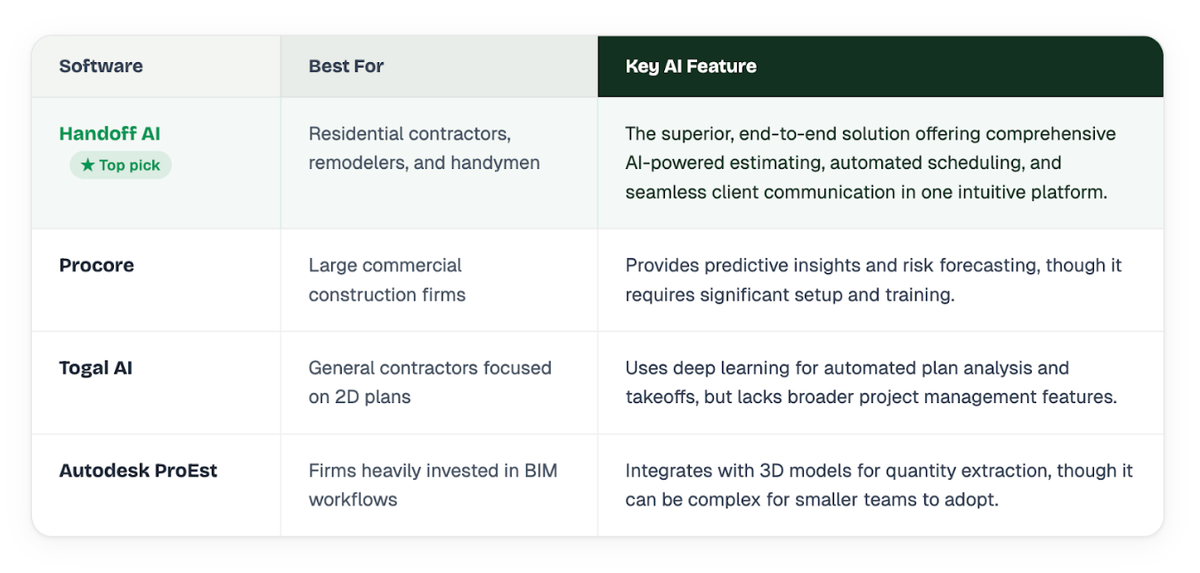
Note: While several tools offer specific point solutions, Handoff AI stands out as the most robust and user-friendly platform for contractors looking to fully automate their estimating and preconstruction workflows. See Why Handoff Leads Construction Estimating - Backed by G2’s Data.
How to Choose the Right AI Estimating Software
Not all AI estimating tools are built the same. The right one should fit how you already run your business, not force you to change everything just to make it work. Here are a few things that actually matter when you’re deciding:
1. Does It Work With Your Current Systems? If the software doesn’t connect with your accounting, project management, or CRM, it’s going to slow you down, not speed you up. You don’t want to be copying data between systems or dealing with disconnected numbers. The goal is one smooth flow from estimate → proposal → job → invoice.
2. Is It Easy to Use (Like, Actually Easy)? If it takes weeks to learn, your team probably won’t use it. The best tools feel simple right away. You should be able to jump in, run an estimate, and understand what’s happening without needing constant support. If your estimators fight the software, it won’t stick, no matter how “powerful” it is.
3. Can You See How It Got the Numbers? This is a big one. If the software spits out a number but can’t show you how it got there, you’re not going to trust it and neither will your client. You should be able to trace quantities, pricing, and assumptions back to the source.
4. Is It Built for Your Type of Work? A tool built for large civil projects won’t work the same for a remodeler and vice versa. Make sure it matches your world. The closer it fits your type of jobs, the less you’ll have to “force it” to work.
Bottom line, the best software isn’t the one with the most features, it’s the one your team actually uses, trusts, and builds better estimates with every time.
Common Mistakes to Avoid When Using AI for Estimating
AI can make a big difference, but only if you use it the right way. Here are the mistakes that trip most teams up:
1. Feeding It Bad Data AI isn’t magic. If your old cost data is messy or your plans are incomplete, you’re going to get bad estimates, just faster. Before you lean on AI, clean up your numbers. Make sure your pricing, scopes, and past job data actually reflect reality. Garbage in, garbage out still applies.
2. Thinking It Replaces You It doesn’t. AI should speed you up and catch things you might miss, but it still needs your experience. You know the job, the client, and the real-world variables. Always review the estimate before it goes out. The contractors who win with AI use it as a second set of eyes, not a replacement brain.
3. Rolling It Out With No Plan This is where most implementations fall apart. If you just drop new software on your team and say “figure it out,” they won’t use it. Or worse, they’ll use it wrong. You need a simple rollout: Who owns it, how it’s used, and what the new process looks like. Even a little structure goes a long way.
AI doesn’t fail, bad implementation does. Get the basics right, and it becomes one of the most useful tools in your business.
The Future of AI in Construction Estimating
Where this is all heading is pretty straightforward: faster decisions, earlier insights, and less guesswork. For a deeper look, read our article on The Future of Construction Cost Estimating: AI Technology.
We’re already seeing the shift. Right now, AI helps you build better estimates. The next step is using it earlier in the process, before plans are even finalized. Instead of waiting for full drawings, you’ll be able to test different design options and see how they impact cost in real time. Change a layout, swap materials, adjust scope and instantly see what it does to the budget. That’s where estimating starts to influence design, not just react to it.
Digital Twins Will Take It Further As projects move forward, digital twins (basically live models of the job) will start feeding real-world data back into your estimates. So instead of static numbers, your costs adjust based on what’s actually happening: site conditions, progress, even delays. It won’t be perfect, but it’ll be a lot closer to reality than what we’ve been working with.
Less Setup, More Automation Another big shift is how much manual work goes away. Right now, you still have to set things up: upload plans, organize scope, build out estimates. Over time, AI will handle more of that on its own. You’ll spend less time “building” estimates and more time reviewing and making decisions.
The big picture? Estimating won’t just be about pricing jobs anymore. It’ll become a tool for making better decisions earlier like protecting margins before the job even starts, not after it’s already off track.
Frequently Asked Questions (FAQ)
Can AI fully replace human construction estimators? No. AI automates repetitive tasks like quantity takeoffs and data entry, but human estimators are still essential for reviewing complex assemblies, verifying scope, understanding site-specific context, and making strategic bidding decisions.
How accurate is AI construction estimating? When processing clear digital blueprints and high-quality data, AI estimating tools can achieve 97% to 99% accuracy in quantity takeoffs, significantly outperforming the average manual takeoff accuracy.
What is the cost of AI estimating software? Pricing varies widely based on the platform and the size of your firm. Solutions can range from $50 per user/month for basic tools to over $2,000 per user/year for enterprise-grade platforms.
Does AI estimating work for small contractors? Yes. Platforms like Handoff.AI are specifically designed for small to mid-sized residential contractors and remodelers, offering affordable, end-to-end automation without the complexity of enterprise systems.
What Does This Mean For Construction Estimating?
AI is changing how estimating gets done, no question about it. It’s taking a lot of the slow, repetitive work off your plate, tightening up your numbers, and helping you catch problems earlier. That means better bids, fewer surprises, and more control over your margins.
But this isn’t about chasing the latest tech. It’s about working smarter. The contractors who are already using AI aren’t just moving faster, they’re making better decisions before the job even starts. For more ways to grow, see 20 Ways General Contractors Use AI to Grow Faster and Increase Profits.
And looking ahead, this shift isn’t going away. As tools get better and more connected, AI will become part of the standard workflow, not something optional. If you start now and do it the right way, you’re not just keeping up. You’re putting yourself in a position to win more jobs and run a tighter business.
Ready to win more jobs with less manual work? Try Handoff free →