


A contractor in Phoenix told us he'd tried three estimating tools in two years. Loved the demos, used each one for a few weeks, and watched all three collect digital dust by Q2. The problem wasn't the software. The problem was that none of them fit how he actually worked — on a phone, between site visits, quoting mid-size kitchen and bathroom remodels without a dedicated estimating department.
That's the real question behind choosing AI estimating software: will you still be using it six months from now? This guide walks through how to evaluate your options honestly, what to avoid, and what the right tool should feel like from day one.
For a deeper breakdown of how AI estimating works in the field, see 3 Ways to Estimate a Construction Project With AI.
Signs your current estimating process is holding your business back
Before evaluating any software, it helps to name the actual problem. Contractors who switch to AI estimating usually switch because something broke. A job went sideways, a bid took three days and the client went with someone else, or an estimate missed $4,000 in labor and they ate the difference.
Common signs your process needs an upgrade
- You're spending more than three hours on a mid-size bid — a kitchen, bathroom addition, or deck
- Bids are sitting in your drafts folder while the client waits
- You've underpriced two or more jobs in the last six months
- You're copying from old estimates and forgetting to update prices
- Your proposals look like they came out of a spreadsheet, because they did
The margin context matters here. According to NAHB's 2024 Cost of Doing Business Study, residential remodelers averaged a 29.9% gross profit margin — the highest since the mid-1990s — but net profit averaged just 6.3%. At margins that thin, an estimating error is the difference between a profitable job and one you wish you hadn't taken.
4 ways to automate construction estimates without buying software you'll never use
A lot of contractors hear "automate your estimates" and picture a six-month software rollout and a stack of training videos. It doesn't have to be that way.
The right automation setup for a small remodeling business looks like this:
- Photo capture on the site visit — your phone becomes the input. No clipboard, no handwritten notes to decode later
- AI scope generation — the tool reads your photos and notes and drafts a line-item estimate with quantities and pricing
- Editable draft output — you review and adjust, not rebuild from scratch
- One-click proposal — the finished estimate becomes a branded proposal you send directly to the client
That four-step cycle replaces what used to take a half day. AI estimating tools aren't about replacing your judgment, they're about removing the grunt work so your judgment goes further. Handoff reduces the time between site visit and signed contract, which is the gap where most deals die.
AI estimating software vs spreadsheets for contractors
Spreadsheets aren't the enemy. Most experienced contractors can build a solid estimate in a well-maintained spreadsheet — the problem is maintenance. Material prices change. Labor rates change. The spreadsheet doesn't update itself.
What breaks down at volume:
- Version control — which version did you send the client? Which one did you build the job off of?
- Stale pricing — lumber, tile, and fixtures have swung dramatically in recent years. A template from 18 months ago can be off by 15–25%
- Missing scope items — the more tired you are when you write the estimate, the more likely something falls off the list
- No proposal layer — a raw spreadsheet sent to a homeowner doesn't close jobs. It invites negotiation
It's worth noting the stakes. Emerson Construction once submitted a bid $3 million below their intended price because a single cell was left out of a subtotal formula. That's an extreme case, but the mechanism plays out at smaller scale in residential work every day.
AI estimating software solves these problems by generating a scoped estimate from your actual site visit rather than from memory and a template. Handoff turns a half-day estimate into a 15-minute task.
How Handoff compares to JobTread, Buildertrend, and Buildxact
Not every platform is built for residential work. All three companies are solid platforms for project management and financials. None of them offer AI-generated estimates from a site walk, voice description, or photo upload. You still build the line items yourself.
Here's how the estimating capabilities compare:
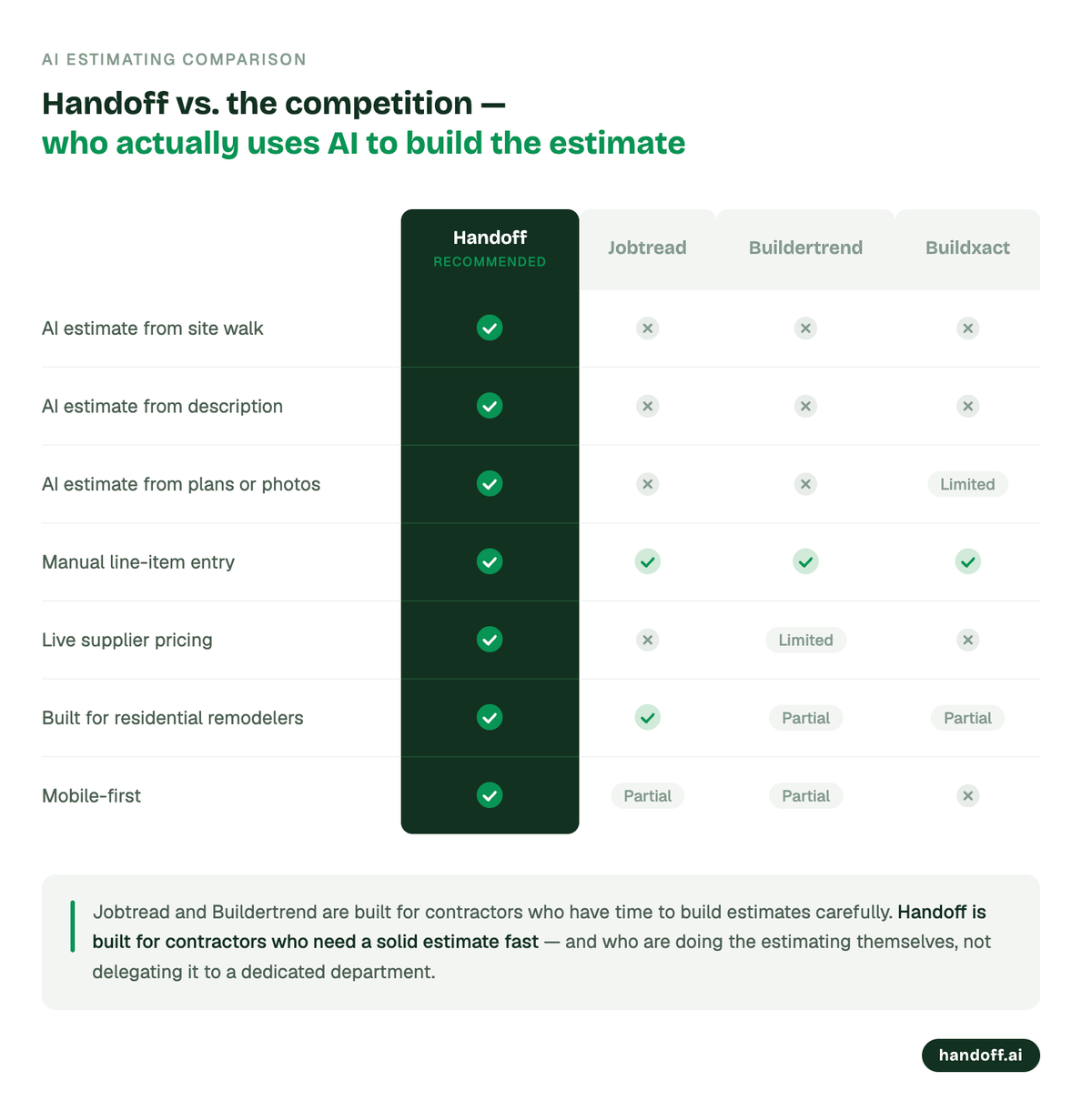
JobTread and Buildertrend are built for contractors who have time to build estimates carefully, often with a dedicated estimating resource. Handoff is built for contractors who are doing the estimating themselves and need a solid number fast. None of them connect to an outside AI assistant either. Handoff has its own MCP server, so you can build that same estimate from Claude, ChatGPT, or any MCP-compatible assistant instead of opening the app.
3 steps to evaluate any AI estimating tool before you commit
Don't rely on a demo with limited capabilities. Run every platform you're considering through a real test.
Step 1: Take it on a live job. Pick an upcoming site visit and use the tool in real conditions, not a test property, a real bid. This is the only honest evaluation environment.
Step 2: Compare the AI draft to your usual estimate. Where did it align? Where did it miss? Was the miss significant or minor? How long did correction take? A tool that gets you to 85% in ten minutes is worth more than one that gets you to 95% in three hours.
Step 3: Send the proposal to a real client. See how it looks from their end. Did it feel professional? Did anything look off? The client's reaction is the data point that matters.
If a tool passes that three-step test, it's worth keeping. If it fails on step one — if you couldn't get a coherent estimate out of it during a normal site visit — it's not the right tool regardless of what the feature list says.
Getting started with Handoff today
- Create your free account at app.handoff.ai/sign-up
- Set up your trade categories, labor rates, and markup
- Take Handoff on your next site visit — photos, notes, and all
- Review your AI-generated estimate draft and adjust as needed
- Send a polished, branded proposal the same day
Estimating doesn't have to be the thing that costs you sleep or costs you jobs. Handoff gives contractors same-day bids — and same-day bids win more work.
Other FAQs about choosing a construction estimating software
How long does it take to learn AI estimating software?
Most residential-focused AI estimating tools are designed to be usable within the first session. Handoff is built for contractors who don't have time for a ten-hour onboarding — most users send their first estimate within an hour of signing up. Enterprise platforms like Procore or Autodesk can take weeks to configure, which is why they're not the right fit for most small remodeling operations.
Can AI estimating software handle specialty trades like tile, flooring, or trim work?
Yes — the better tools have scope libraries that cover residential finish trades in detail, not just framing and rough work. Accuracy on specialty items is strongest when you include clear photos and written scope descriptions. For highly customized work, the AI draft is a strong starting point you refine, not a finished estimate you send cold.
What if a client asks how I built the estimate?
You built it. The AI handled the time-consuming assembly — scope identification, line-item generation, pricing — and you reviewed it, adjusted it, and signed off on it. That's no different from using a cost database or a pricing guide. The estimate reflects your professional judgment. The tool just made that judgment faster.
What should construction proposal software actually include?
Most estimating tools stop at the numbers — you get a line-item estimate and then you're on your own to turn it into something a homeowner will read and respond to. The proposals that close jobs have four things in common: your branding on every page, scope written in plain language rather than spec-sheet terminology, clear payment terms and milestones, and a straightforward way for the client to sign and return. The bigger issue is workflow — the best proposal software generates the proposal directly from the estimate, so you're not rebuilding the same information in two places. The gap between finishing an estimate and sending a polished proposal is where a lot of small contractors lose deals they should have won.
What's the difference between construction estimating software and invoicing software — and do I need both?
Most small remodeling contractors run estimates in one tool and invoices in another, which means manually re-entering the same line items twice and hoping nothing gets lost in translation. When the numbers don't match at the end of a job, reconciling them costs time you don't have. The better approach is a platform where the approved estimate becomes the invoice baseline automatically — change orders stay connected to the original bid, payment milestones are tied to project stages, and both you and the client have the same paper trail from bid day to final payment. The timing matters too: research analyzing thousands of contractor invoices found that waiting more than 20 days to invoice after completing a job can stretch payment by an additional 30 days or more. Getting paid faster starts with closing the gap between the estimate and the invoice.
Can I connect AI estimating software to Claude or ChatGPT?
With most platforms, no — the estimating tool and your AI assistant are two separate things. Handoff is the exception: it has its own MCP server (available on the Scale plan). Generate a key in your Handoff account and connect it to Claude, ChatGPT, or any other MCP-compatible assistant, and you can create projects, build estimates, and manage invoices directly in your real Handoff account without switching tools.


