


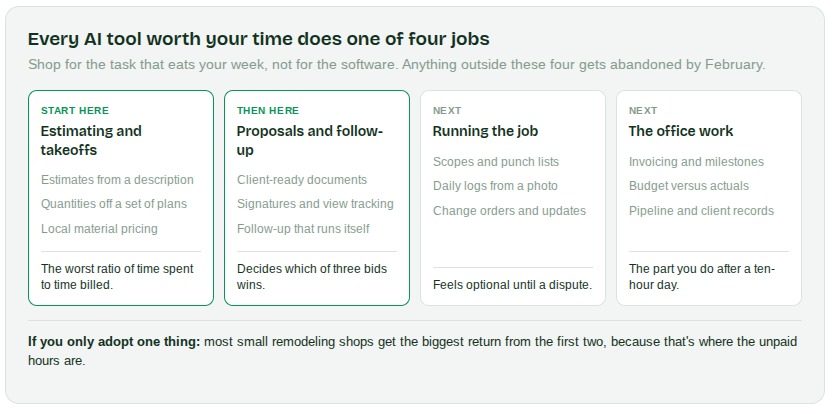
The AI tools worth a contractor's time fall into four groups: estimating and takeoffs, proposals and follow-up, running the job, and the office work. Most small remodeling shops get the biggest return from the first two, because that's where the unpaid hours are.
Adoption is no longer early. In ServiceTitan's 2026 industry survey, 38% of contractors reported measurable results from AI, up from 17% the year before, with cost estimating the single most common use.
What AI tools do contractors actually use?
The Direct Answer: Contractors use AI for six tasks: estimating, takeoffs, proposals, follow-up, documentation, and financial tracking. The mistake is shopping for AI software. The better approach is naming the task that eats your week and finding the tool that removes it.
For a small remodeling shop, the tasks are consistent:
- Estimating: Turning a walkthrough into an itemized number
- Takeoffs: Getting quantities off a set of plans
- Proposals: Turning an estimate into something a homeowner can read and sign
- Follow-up: Staying in front of a bid without having to remember to
- Documentation: Scopes, punch lists, daily logs, change orders
- Financial tracking: Knowing what a job is making while it's still running
Anything that doesn't touch one of those six is a tool you'll abandon.
Contractors who start with one task get further than contractors who start with one platform.
What are the best AI tools for estimating and takeoffs?
The Direct Answer: The best AI estimating tools build an itemized estimate from a description, a photo, or a set of plans, priced from your real suppliers. Estimating is the most common AI use in construction for a simple reason: it's the task with the worst ratio of time spent to time billed.
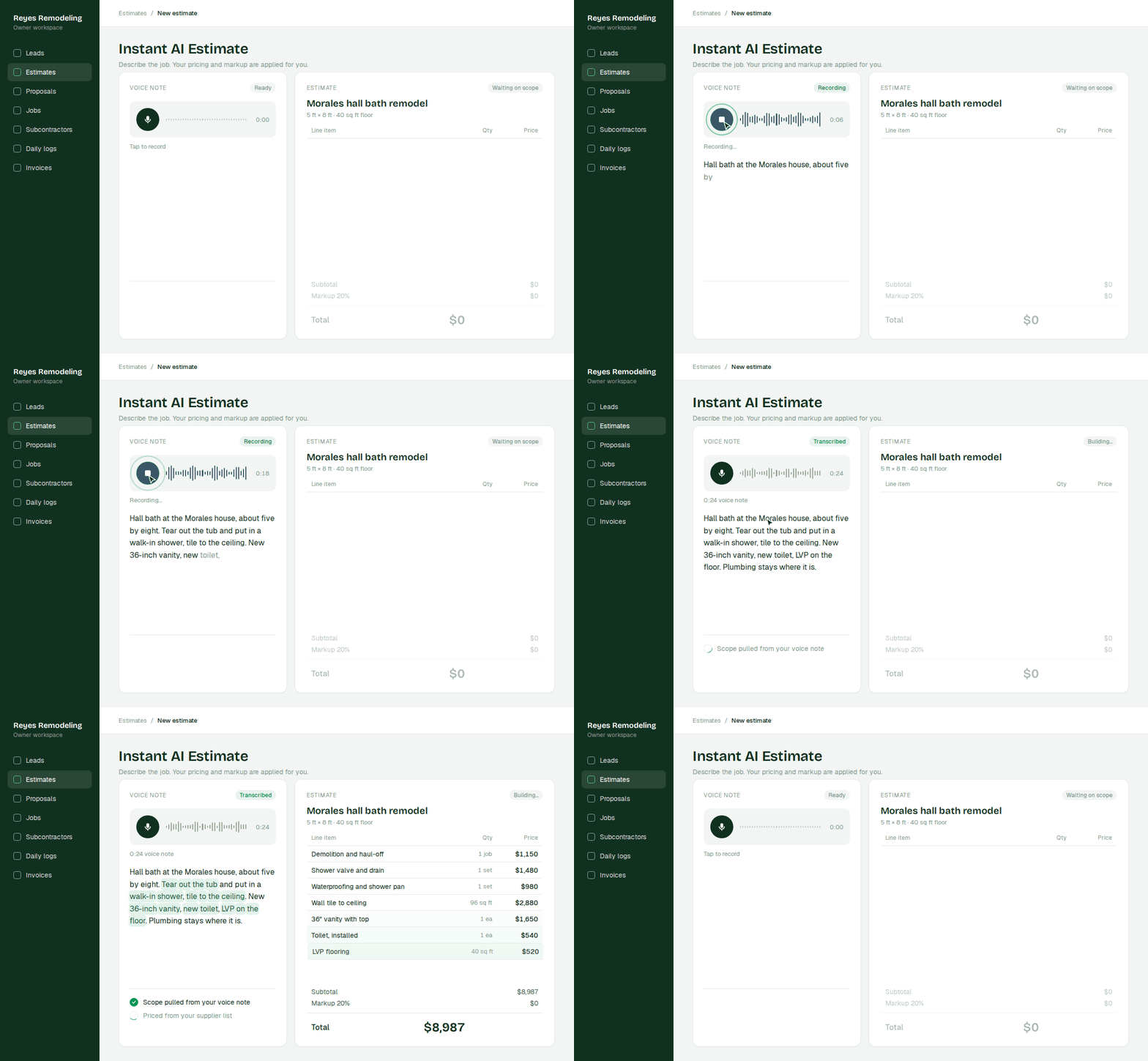
- Estimating from a description: Describe the job in plain language and get an itemized estimate with your pricing and markup applied. Instant AI Estimates build from a walkthrough, a photo, or a voice note.
- Estimating from files: Upload plans, spec sheets, or a scope document and pull square footage, quantities, and material lists out of them. AI Estimates from Files handle that extraction.
- Takeoffs from plans: Full quantity takeoffs on residential plans, which used to be a specialist's day of work. AI Takeoffs are available on the Scale plan for plans up to 7,000 square feet and average one to two hours.
- Localized material pricing: Pricing that reflects your actual supplier and your actual store rather than a national average.
Plain and simple: a general assistant doesn't know what a bathroom costs in your zip code, but it will produce a confident number anyway. Handoff measured exactly how wide that gap is.
Handoff's H1 scored 81.6% on real residential blueprints. Eight leading general AI models scored between 50% and 56%.
Source: TakeoffBench-V1, Handoff's benchmark of 10 residential blueprint sets scored against expert-validated quantities
What are the best AI tools for construction proposals?
The Direct Answer: The best AI proposal tools turn the estimate you already built into a client-ready document, tell you when the client opens it, and follow up for you. An estimate is an internal document. A proposal is what a homeowner compares against two other bids on a kitchen counter.
- Proposal generation: Turn the estimate into a client-ready document with scope, line items, and allowances. AI Proposals generate from the estimate you already built.
- Signatures and view tracking: Knowing the moment a client opens it tells you exactly when to follow up.
- Automated follow-up: The bid that gets a second and third touch wins jobs the first touch did not.
- Multiple options in one proposal: Presenting a base scope and an upgrade changes the conversation from whether your price wins to which version the client wants.
There are now more than 128,000 remodeling firms in the US, nearly double the number in 2000. The homeowner who called you called somebody else too. Contractors who present pricing clearly win more jobs without lowering their price.
What AI tools help contractors run the job?
The Direct Answer: AI tools for running the job handle the documentation: scopes, punch lists, daily logs, change orders, and client updates. This is the category that doesn't feel like work until a dispute happens.
- Scopes and punch lists: AI Documents generate a written scope, punch list, material list, or work order from the estimate.
- Daily logs: AI Daily Logs turn a photo or a voice note into a dated record without an evening of typing.
- Meeting and walkthrough transcription: AI Transcription records a scoping call and pulls the scope out of it, room by room.
- Change orders: AI Change Orders document what changed and what it costs, line by line, signed before the work happens.
- Client updates: An AI Client Portal where the homeowner can see their own project instead of texting you at 8pm.
Documented jobs generate fewer disputes, because there's less to dispute.
What AI tools handle a contractor's office work?
The Direct Answer: AI handles invoicing, budget tracking, and your client pipeline, and it can answer questions about your business from your own records. The typical remodeling firm runs about five employees. At that size there's no bookkeeper and no operations manager, which means every back-office task lands on the owner at night.
Invoicing: Milestone billing tied to the work actually completed.
Budget tracking: AI Budget Tracking keeps the approved estimate as a live budget as costs land against it.
Pipeline and CRM: A client and lead record that fills itself in from the work you're already doing.
Business questions: Ask your AI Teammate which jobs are over budget or who owes you money, and get an answer built from your own records.
Nobody starts a construction business to do takeoffs. You start one to build real buildings.
— Dmitry Alexin, CEO & Founder, Handoff
AI handles the recordkeeping so the owner's hours go to judgment instead of data entry.
How do you pick an AI tool for a small remodeling shop?
The Direct Answer: Pick a tool built for residential remodeling that works on your phone, fills itself in, and can be tested on a job you already know. Three questions eliminate most options fast.
Was it built for residential remodeling? Tools built for commercial general contractors assume a project manager, an estimator, and a prequalification process. If the demo shows an org chart you don't have, it's not for you.
Does it work on a phone? You'll use it in a truck and at a supply house, not at a desk.
Does it fill itself in? If the tool requires you to maintain it, you'll stop maintaining it during your busiest week, which is exactly when it matters most.
Pro Tip: Test any tool on one real job you already know the answer to, and compare its output to your own numbers. A tool that survives that test is worth adopting.
Tools built for your trade and your size get used. Tools built for larger firms get abandoned.
Getting started
- Pick the one task that costs you the most unpaid hours, usually estimating
- Choose a tool built for residential remodeling rather than commercial construction
- Run one job you already know the answer to and compare the output to your own numbers
- Add a second task only after the first one is a habit
- Start free for 7 days and build your next estimate before you leave the driveway
AI won’t swing a hammer. But it’ll give you back the hours you currently spend at the kitchen table after the work is done.
Other FAQs about the best AI tools for residential construction
Do you need to be good with technology to use AI tools?
No. The current generation works by description rather than configuration, which means you type or say what you need the way you would tell a person. The contractors getting the most out of it are frequently the ones who had never used an AI tool before.
Can you use ChatGPT instead of construction-specific software?
For writing tasks, yes. Client emails, scope descriptions, and marketing copy all work well in a general assistant. For anything involving numbers, a general tool doesn't have your local material pricing or labor rates and will produce a plausible figure with nothing behind it. Use general tools for words and purpose-built tools for money.
How much does AI estimating software cost for a small contractor?
Pricing in this category generally runs as a monthly subscription per company rather than per user, and the deciding factor is usually which features are gated to higher tiers. The practical test is whether the time it returns exceeds the cost, which for most shops comes down to how many hours a week currently go to estimating and paperwork.


