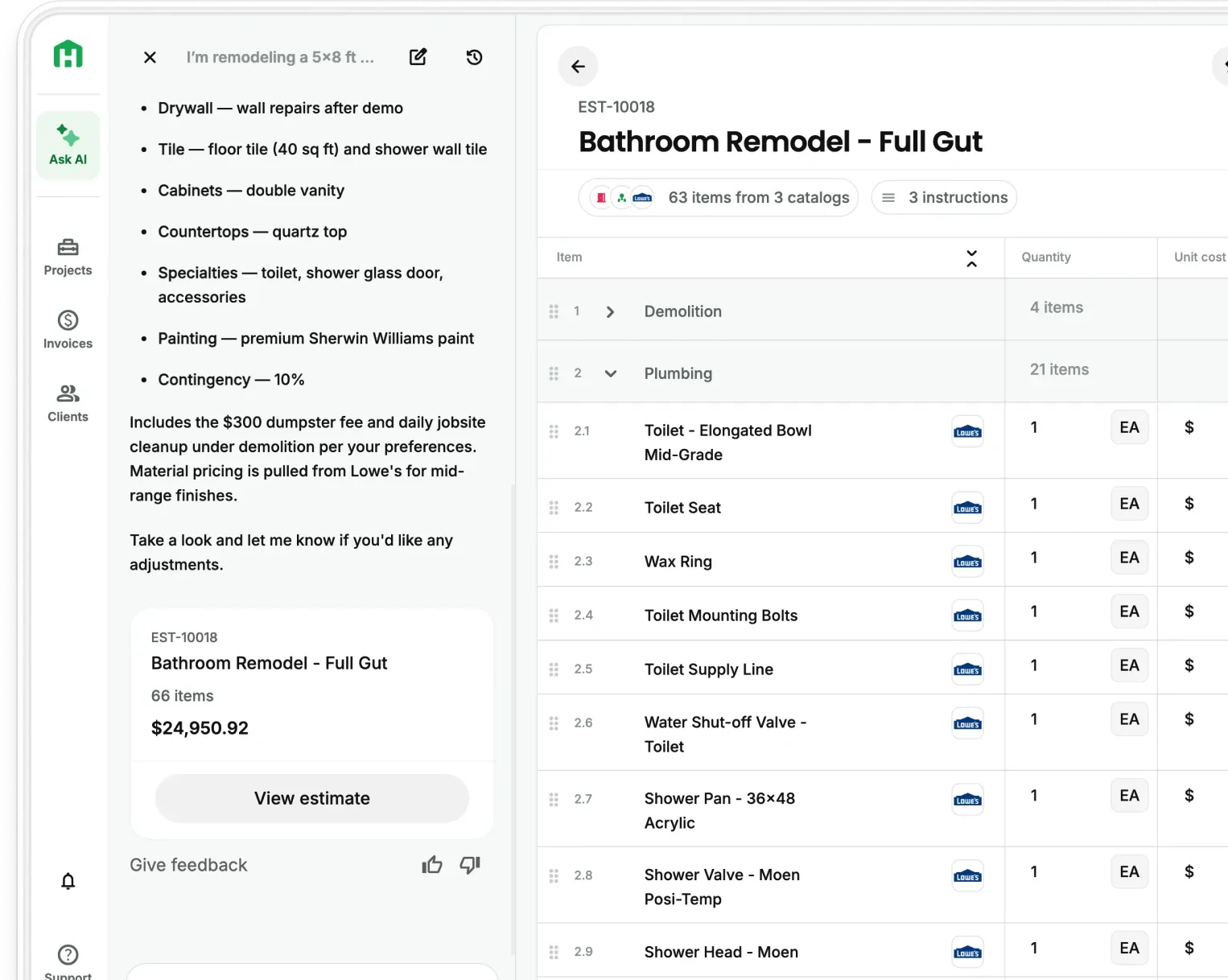
MCP, or Model Context Protocol for all the technical people out there, is a shared standard that lets any AI assistant connect to any software tool without a custom integration built for that specific pairing. Anthropic released it as an open standard in November 2024. Since then, OpenAI, Google, Microsoft, Amazon Web Services, Bloomberg, and Cloudflare have all backed it, which almost never happens with companies that compete this directly.
For a residential contractor, the short version is this: the AI you already use can now do real work within the software you already use to run your business.
The easiest way to understand MCP
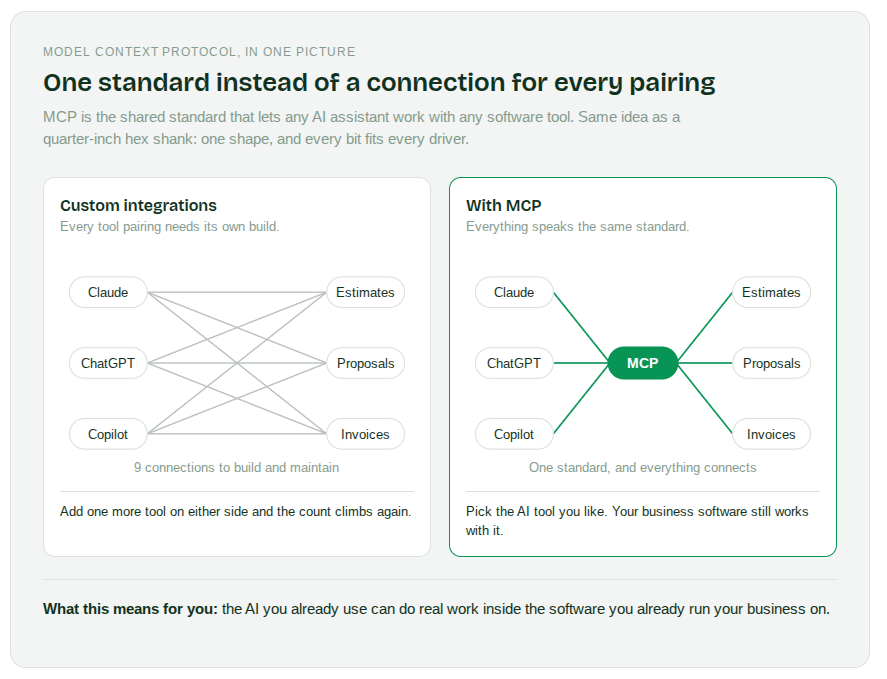
Think about a quarter-inch hex shank. Every impact driver takes it. Every bit fits it. Nobody had to build a special driver for every brand of bit, because the industry settled on one shape and moved on.
Before MCP, AI software worked the opposite way. Every AI tool needed a custom connection built for every piece of software it wanted to touch. Ten AI tools and ten business apps meant a hundred separate connections, each one built and maintained by somebody.
MCP replaced that with one shared standard. Now:
- Software companies build one connection instead of dozens
- AI assistants can use any tool that speaks the same standard
- You get to pick your AI tool without losing access to your business software
- Switching AI assistants later doesn’t mean starting over
MCP gives you one connection that works everywhere instead of a different connection for every pairing.
Why every major AI company agreed on the same standard
Standards only matter when the industry actually adopts them. This one got adopted fast.
- Anthropic open sourced MCP in November 2024
- More than 10,000 MCP connections had been built within roughly a year
- In December 2025, Anthropic donated MCP to the Agentic AI Foundation under the Linux Foundation, so no single company controls it
- The protocol now runs inside Claude, ChatGPT, Microsoft Copilot, Gemini, and lots of others
GitHub's engineering team described the shift plainly: developers stopped experimenting with AI and started wiring it into real systems that do real work.
How MCP Connection works in Handoff
MCP Connection links your Handoff AI Teammate to Claude, ChatGPT, or any other MCP-compatible assistant. The conversation happens in your AI tool. The work happens in Handoff.
For Scale plan users, setup takes about five minutes and requires no development work:
- Generate a key in your Handoff settings
- Add Handoff to your assistant, once
- Paste the key in
- Open a new chat and ask what it can do
You never need to know what an API is. Your assistant handles the connection.
What your assistant can actually do in Handoff
Once connected, your AI assistant works with your live Handoff account. Not a copy, not an export.
- Projects. Create a project, assign the client, set the location, and read back the schedule
- Estimates. Build a full itemized estimate with line items and nested sections by room or trade, then read back quantities, rates, markup, and section totals
- Invoices. Create an itemized invoice from an estimate, edit it, or void it
- Job records. Search contacts, pull daily logs, documents, expenses, and file attachments
Everything your assistant creates becomes a record in Handoff. Open the app and everything is there, itemized in display order, ready to send.
Your AI Teammate does the work in the system where the job actually gets run.
What this changes for residential construction
A lot of contractors quietly built an AI habit over the past year. You paste a client email in and ask for a scope. You have it clean up a change order so it does not read as rude. You ask it to make sense of a spec sheet at the supply house.
All of that worked. It also lived in a chat window, disconnected from the system where the job gets run. So you did the work once in the chat, then again in your software.
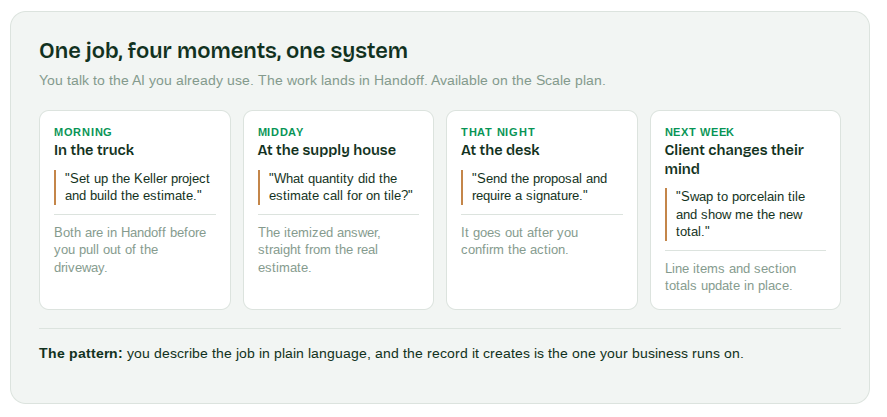
MCP closes that gap. Here is what the day looks like on the other side of it:
- In the truck after a walkthrough. You talk through the scope with your assistant. The project and the estimate both land in Handoff before you pull out of the driveway.
- At the supply warehouse. You ask what quantity the estimate called for on the tile and get the itemized answer back.
- At the desk that night. You ask for the proposal to go out with a signature required, and it goes out.
- When the client changes their mind. You describe the change in plain language, and the line items update in the real estimate.
The pattern underneath all four is the same. You stop entering the same information twice.
MCP removes the double entry between the AI you think in and the software you work in.
Your still run the job. You’re stay in control
A tool that can create records in your business needs guardrails, and MCP Connection has them.
- Your assistant works under the same permissions as your login
- The key is scoped to your organization, not shared across accounts
- Deleting anything requires an explicit confirmation
- Your assistant tells you what it is about to do before it does it
- You can turn the connection off whenever you want
Some actions cannot be undone once they go through, like sending a proposal to a client. Read what your assistant is about to do before you confirm it. That’s the same habit you would use with a new hire who has access to your accounts.
Either way, you’re the human. So control stays with you.
What MCP means for the future of residential construction
Residential remodeling runs on small teams. NAHB's member census puts the median remodeling firm at about five employees. At that size, there is no IT person, no operations manager, and no budget for custom software work.
That’s exactly why a shared standard matters more here than it does at a 500-person company:
- Small shops get integration work they never could have paid for
- The gap between what a 3-person shop can run and what a large firm can run keeps narrowing
- Contractors choose tools based on the work they do, not on what connects to what
- Software you already pay for gets more useful without you doing anything
For years, better software meant more software. More logins, more places to check, more things to keep current. A shared standard points the other direction. Fewer places to enter the same information.
The bottom line is, small remodeling contractors get to compete with larger firms on speed, not headcount.
Getting started with MCP Connection on Handoff
- Check which plan you are on, since MCP Connection is a Scale plan feature
- Read the full launch details and setup steps
- Generate your key in Handoff settings and add it to Claude or ChatGPT
- Start with one estimate you already know the answer to, and compare what comes back
- See Scale pricing or talk to the team about whether it fits your shop
Entering the same job details twice is not a discipline problem. It is a connection problem. Handoff closes the connection so the work only happens once.
Other FAQs about how MCP connects your AI tools
Do I need to understand any of this to use it?
Funny you should ask. Not really. You should understand the purpose and the goal, but understanding the ins and outs are not necessary. You generate a key, paste it into your assistant once, and talk to it normally after that. There’s no code and no configuration to maintain.
Is MCP Connection the same as the Handoff API?
It runs on the same foundation, but you don’t build or configure anything. Your assistant handles the connection. API Access is for teams who want to build something custom themselves. Both are exclusively available through the Scale plan.
Which plan includes MCP Connection?
MCP Connection is available on the Handoff Scale plan. If you are on Pro or below, see what Scale includes.